Hello everyone.
Question/Issue:
Project uploads onto Arduino Uno Q. It used to update the monitor and run code as camera was moved onto objects, but after a few updates it no longer logs any detections.
Project ID:
1125602
Context/Use case:
The project is supposed to distinguish between various cylindrical objects and log detections via python before sending results to the sketch to control the robot. This worked 2 weeks ago, but hasn’t been recently.
Steps Taken:
- Create Model on Edge Impulse
- Login to Applab and add Video Object Detection Brick
- Select impulse for brick
- Add python code for video callbacks
- Add bridge code for python and sketch
Expected Outcome:
Two weeks ago, program would continually log on python and video detection monitor. Objects and their confidences printed continually. Bridge code allowed me to control arduino microcontroller functions.
Actual Outcome:
As of now, program boots and says everything is running, but seemingly does nothing after setting a new confidence threshold override. Microcontroller code runs normally, but doesn’t have full functionality since bridged functions aren’t being activated.
Reproducibility:
- [X] Always
- [ ] Sometimes
- [ ] Rarely
Environment:
- Platform: [Arduino Uno Q]
- Build Environment Details: [Arduino Applab 0.11.0]
- OS Version: [Windows 11]
- Edge Impulse Version (Firmware): [Edge Impulse Linux Client 1.25.3]
- Edge Impulse CLI Version: [???]
- Project Version: [???]
-
Custom Blocks / Impulse Configuration:
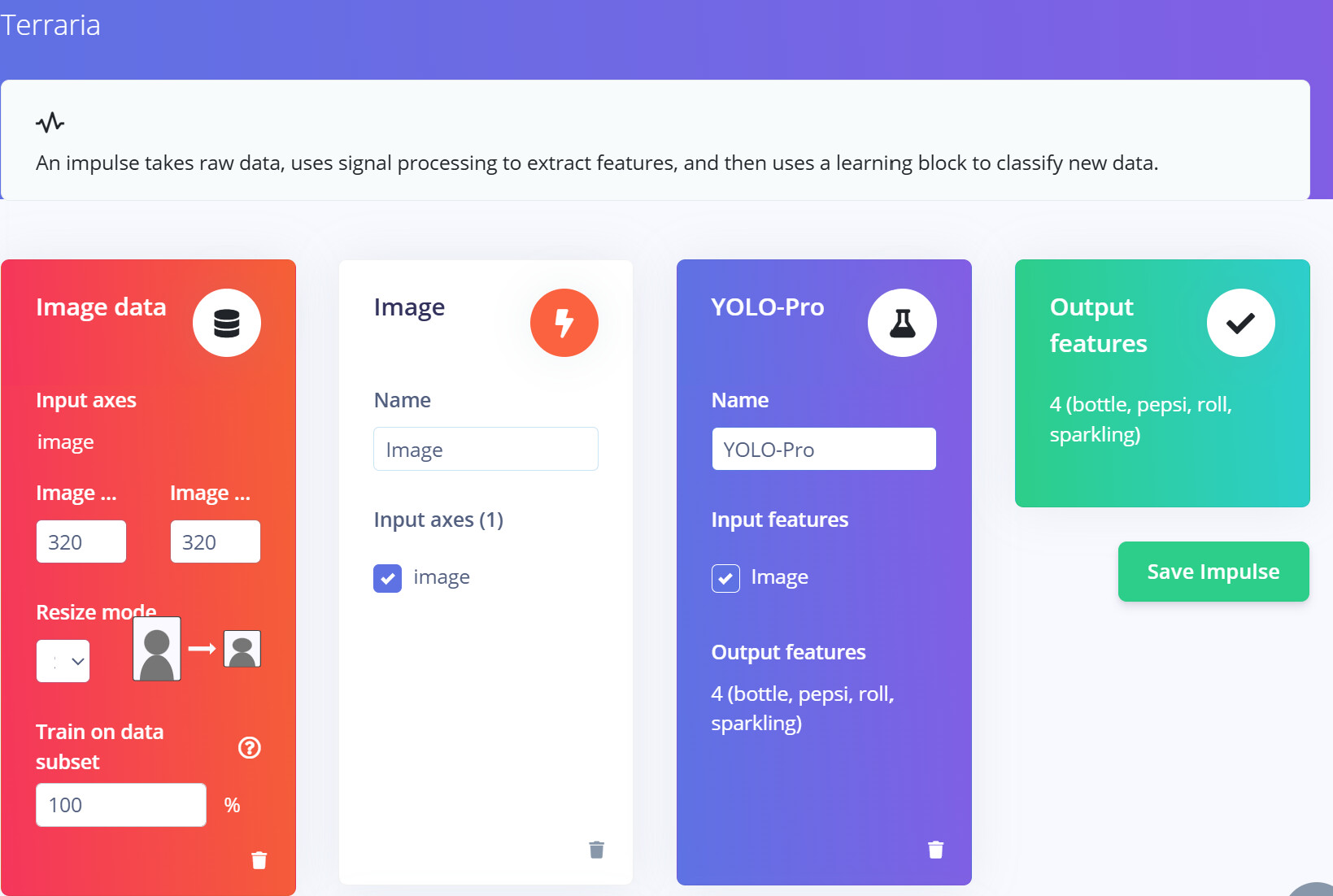
Logs/Attachments:
ARDUINO_VIDEO_OBJECT DETECTION LOG START:
 Starting EI inference runner…
[RUN] Starting the image classifier for Rytelus / Yolo-X Nano Senioritis (v41)
[RUN] Parameters
[RUN] image size 320x320 px (3 channels)
[RUN] classes [ ‘bottle’, ‘pepsi’, ‘roll’, ‘sparkling’ ]
[RUN] Thresholds: 185.min_score=0.5,186.keep_grace=5,186.max_observations=10,186.threshold=0.1 (override via --thresholds )
[GST] checking for /etc/os-release
[GST] In tcp server mode (experimental), waiting on 0.0.0.0:5050 for a connection…
[GST] Connect for example as follows:
[GST]
[GST] gst-launch-1.0 v4l2src device=/dev/video0 ! image/jpeg ! gdppay ! tcpclientsink host=0.0.0.0 port=5050
[GST] gst-launch-1.0 v4l2src device=/dev/video0 ! video/x-raw ! gdppay ! tcpclientsink host=0.0.0.0 port=5050
[GST] gst-launch-1.0 v4l2src device=/dev/video0 ! image/jpeg,width=1280,height=720 ! tcpclientsink host=0.0.0.0 port=5050
[GST]
[GST] or to connect to an inference container:
[GST] gst-launch-1.0 v4l2src device=/dev/video0 ! image/jpeg ! gdppay ! tcpclientsink host=host.docker.internal port=5050
[GST] gst-launch-1.0 v4l2src device=/dev/video0 ! video/x-raw,width=640,heigh=480 ! gdppay ! tcpclientsink host=host.docker.internal port=5050
[GST] gst-launch-1.0 v4l2src device=/dev/video0 ! image/jpeg ! tcpclientsink host=host.docker.internal port=5050
[RUN] Connected to camera “streaming-tcp-server” (run with --clean to select another one)
Want to see a feed of the camera and live classification in your browser? Go to http://172.18.0.2:4912
Want to use predictions in your application? Open a websocket to ws://172.18.0.2:4912
Updating threshold for block ID 185, key min_score to: 0.5… OK
[GST] Restarting streaming tcp server mode…
[GST] Restarting streaming tcp server mode OK
[GST] In tcp server mode (experimental), waiting on 0.0.0.0:5050 for a connection…
[GST] Connect for example as follows:
[GST]
[GST] gst-launch-1.0 v4l2src device=/dev/video0 ! image/jpeg ! gdppay ! tcpclientsink host=0.0.0.0 port=5050
[GST] gst-launch-1.0 v4l2src device=/dev/video0 ! video/x-raw ! gdppay ! tcpclientsink host=0.0.0.0 port=5050
[GST] gst-launch-1.0 v4l2src device=/dev/video0 ! image/jpeg,width=1280,height=720 ! tcpclientsink host=0.0.0.0 port=5050
[GST]
[GST] or to connect to an inference container:
[GST] gst-launch-1.0 v4l2src device=/dev/video0 ! image/jpeg ! gdppay ! tcpclientsink host=host.docker.internal port=5050
[GST] gst-launch-1.0 v4l2src device=/dev/video0 ! video/x-raw,width=640,heigh=480 ! gdppay ! tcpclientsink host=host.docker.internal port=5050
[GST] gst-launch-1.0 v4l2src device=/dev/video0 ! image/jpeg ! tcpclientsink host=host.docker.internal port=5050
Starting EI inference runner…
[RUN] Starting the image classifier for Rytelus / Yolo-X Nano Senioritis (v41)
[RUN] Parameters
[RUN] image size 320x320 px (3 channels)
[RUN] classes [ ‘bottle’, ‘pepsi’, ‘roll’, ‘sparkling’ ]
[RUN] Thresholds: 185.min_score=0.5,186.keep_grace=5,186.max_observations=10,186.threshold=0.1 (override via --thresholds )
[GST] checking for /etc/os-release
[GST] In tcp server mode (experimental), waiting on 0.0.0.0:5050 for a connection…
[GST] Connect for example as follows:
[GST]
[GST] gst-launch-1.0 v4l2src device=/dev/video0 ! image/jpeg ! gdppay ! tcpclientsink host=0.0.0.0 port=5050
[GST] gst-launch-1.0 v4l2src device=/dev/video0 ! video/x-raw ! gdppay ! tcpclientsink host=0.0.0.0 port=5050
[GST] gst-launch-1.0 v4l2src device=/dev/video0 ! image/jpeg,width=1280,height=720 ! tcpclientsink host=0.0.0.0 port=5050
[GST]
[GST] or to connect to an inference container:
[GST] gst-launch-1.0 v4l2src device=/dev/video0 ! image/jpeg ! gdppay ! tcpclientsink host=host.docker.internal port=5050
[GST] gst-launch-1.0 v4l2src device=/dev/video0 ! video/x-raw,width=640,heigh=480 ! gdppay ! tcpclientsink host=host.docker.internal port=5050
[GST] gst-launch-1.0 v4l2src device=/dev/video0 ! image/jpeg ! tcpclientsink host=host.docker.internal port=5050
[RUN] Connected to camera “streaming-tcp-server” (run with --clean to select another one)
Want to see a feed of the camera and live classification in your browser? Go to http://172.18.0.2:4912
Want to use predictions in your application? Open a websocket to ws://172.18.0.2:4912
Updating threshold for block ID 185, key min_score to: 0.5… OK
ARDUINO_VIDEO_OBJECT DETECTION LOG END
PYTHON LOG START:
======== App is starting ============================
2026-11-04 03:37:52.987 INFO - [MainThread] VideoObjectDetection: [VideoObjectDetection] Host: ei-video-obj-detection-runner - URL: ws://ei-video-obj-detection-runner:4912
Video Detector initialized
Callbacks defined
Callbacks connected
Detection lister defined
Detection lister connected
App running!
2026-11-04 03:37:52.988 INFO - [MainThread] V4LCamera: Starting camera…
2026-11-04 03:37:53.224 INFO - [MainThread] V4LCamera: Camera usb:iC700 720P HD: iC700 720P HD driver runs at 30 FPS, throttling to requested 10 FPS
2026-11-04 03:37:53.768 INFO - [MainThread] V4LCamera: Successfully started usb:iC700 720P HD: iC700 720P HD
2026-11-04 03:37:53.773 INFO - [MainThread] App: App started
2026-11-04 03:37:53.775 INFO - [VideoObjectDetection.camera_loop] VideoObjectDetection: TCP connection established to ei-video-obj-detection-runner:5050
2026-11-04 03:37:55.812 INFO - [VideoObjectDetection.object_dete] VideoObjectDetection: WebSocket connection established
2026-11-04 03:37:55.813 INFO - [VideoObjectDetection.object_dete] VideoObjectDetection: Overriding detection threshold. New confidence: 0.5
2026-11-04 03:41:08.302 INFO - [MainThread] App: App is shutting down
2026-11-04 03:41:08.304 INFO - [stop-VideoObjectDetection] V4LCamera: Stopping camera…
2026-11-04 03:41:08.413 INFO - [stop-VideoObjectDetection] V4LCamera: Successfully stopped usb:iC700 720P HD: iC700 720P HD
2026-11-04 03:41:08.414 INFO - [MainThread] Peripherals: Releasing 1 peripheral(s)
======== App shutdown completed =====================
======== App is starting ============================
Video Detector initialized
Callbacks defined
Callbacks connected
Detection lister defined
Detection lister connected
App running!
2026-11-04 03:42:57.542 INFO - [MainThread] VideoObjectDetection: [VideoObjectDetection] Host: ei-video-obj-detection-runner - URL: ws://ei-video-obj-detection-runner:4912
2026-11-04 03:42:57.543 INFO - [MainThread] V4LCamera: Starting camera…
2026-11-04 03:42:57.779 INFO - [MainThread] V4LCamera: Camera usb:iC700 720P HD: iC700 720P HD driver runs at 30 FPS, throttling to requested 10 FPS
2026-11-04 03:42:58.343 INFO - [MainThread] V4LCamera: Successfully started usb:iC700 720P HD: iC700 720P HD
2026-11-04 03:42:58.348 INFO - [MainThread] App: App started
2026-11-04 03:42:58.350 INFO - [VideoObjectDetection.camera_loop] VideoObjectDetection: TCP connection established to ei-video-obj-detection-runner:5050
2026-11-04 03:43:00.379 INFO - [VideoObjectDetection.object_dete] VideoObjectDetection: WebSocket connection established
2026-11-04 03:43:00.393 INFO - [VideoObjectDetection.object_dete] VideoObjectDetection: Overriding detection threshold. New confidence: 0.5
PYTHON LOG END
Additional Information:
Again, I had the entire setup working a few weeks ago, but somewhere between updating the Uno Q via applab and retraining the model it stopped working. I’ve tried manually running and installing it via the instruction on this link, but am not proficient enough with linux to know if that method worked any better. I’ve tried making slightly different impulses and uninstalling and reinstalling the brick on applab. Sample Inspiration projects involving video object detection all run normally.