Question/Issue:
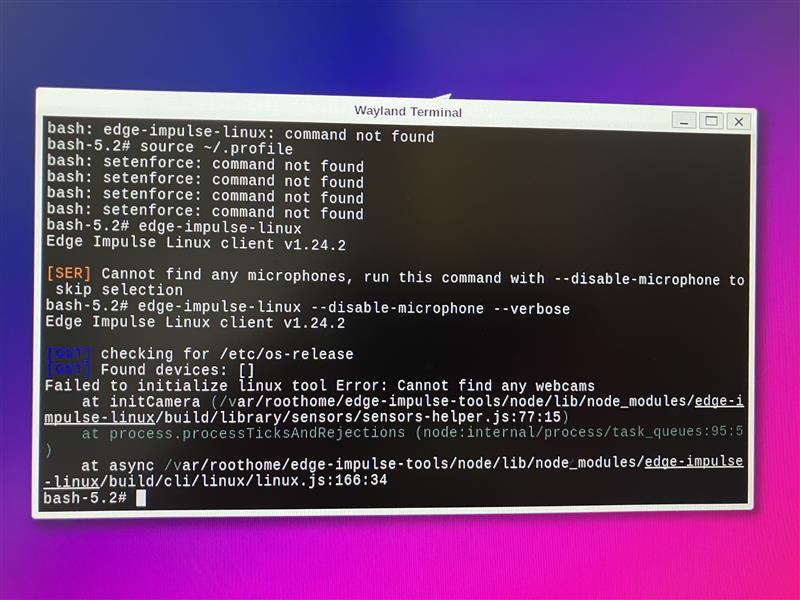
Trying to follow the Tria Vision AI Kit Deployment, get to running the Edge Impulse tool on the Vision AI Kit, but it doesn’t recognise any webcams. I have a MIPI Camera plugged into MIPI interface 1, how do I get it to recognise this / is Edge Impulse only setup to work with USB Webcams? If so is there a way I can force it to use the MIPI camera?
Project ID:
912463
Context/Use case:
Running edge-impulse-linux on the QCS6490
Steps Taken:
- install steps follow as per guide: Tria Vision AI-KIT 6490 - Edge Impulse Documentation
- run edge-impulse-linux --disable-microphone
- System doesn’t recognise the MIPI Camera
Expected Outcome:
Expect the MIPI Camera to be detected as a webcam
Actual Outcome:
System reports Error: cannot find any webcams
Reproducibility:
- [x] Always
- [ ] Sometimes
- [ ] Rarely
Environment:
- Platform: TRIA Vision AI Kit QCS6490
- **Build Environment Details: Linux qcs6490-visionai-kit 6.6.97-qli-1.6-ver-1.2-05029-g53c11c30e98d-dirty #1 SMP PREEMPT Tue Sep 16 19:00:01 UTC 2025 aarch64 GNU/Linux
- **OS Version: QCom Robotics Reference Distro with ROS 1.6-ver-1.2
- **Edge Impulse Version (Firmware): Edge Impulse Linux Client V1.24.2
- To find out Edge Impulse Version:
Logs/Attachments:
Additional Information:
The OS run has a demo application that uses the MIPI Camera, but Edge Impulse doesn’t recognise it. I suspect Edge Impulse is only looking for USB cameras? Is there a way I can force it to look for the MIPI Input?
