Failed to start job: Not all labels are numeric, this is required for regression models

I am unable to train a model on an 18-channel spectra data of the AS7265X sensor.

I collected excitation-emission (EEM) spectra data from my experiment, but I am struggling to train a regression model in the Edge Impulse Studio. The data is fluorescent intensities of samples P+D mixed in ratios
Sample 1: P=100%, D=0%;
Sample 2: P=75%, D=25%;
Sample 3: P=50%, D=50%;
Sample 4: P=25%, D=75%; and
Sample 5: P=0%, D=100%.

This mixture has been considered for different conditions, resulting in 5 CSV files with 106 timestamped rows.
Initially, I had challenges uploading CSV according to the Edge Impulse documentation. But later, it was intermittently successful in uploading but failed in feature extraction, or sometimes it complained of the label and, other times, the timestamp, which can be visible in the CSV files.

I thought using the forwarder may ease up, so, using the forwarder this time,
$edge-impulse-data-forwarder --baud-rate 230400

I could connect and stream the data; the attached image shows a screenshot. But for the past three days, I have been at the same spot; the training would fail and issue the following report show below.
Just trying out weird things, I attempted classification, and it went through but with 0% accuracy and 93 Loss. Yes, I wasn’t expecting anything.

The fail report:

" Failed to start job: Not all labels are numeric, this is required for regression models
Application exited with code 1
Job failed (see above).
"

This is the data from the serial port; the first is the timestamp, followed by the 18 channels’ data:

92,0,0,0,0,0,0,13,0,0,0,10,0,13,11,13,9,0,0

0,0,0,0,0,0,0,0,0,0,0,0,0,0,0,0,0,0,0

90,0,0,0,0,0,0,13,13,0,11,2560,0,13,11,0,0,0,0

This is how I streamed the data from the serial port to the PC. The structured data is passed to the forwarder when connecting as:
timestamp,Ch1,Ch2,Ch3,Ch4,Ch5,Ch6,Ch7,Ch8,Ch9,Ch10,Ch11,Ch12,Ch13,Ch14,Ch15,Ch16,Ch17,Ch18

timestamp: sampling time
Spectra data = Ch [1- 18]
This same structure is maintained for the different blending ratios of P and D.
I left the split ratio to the default 80/20.
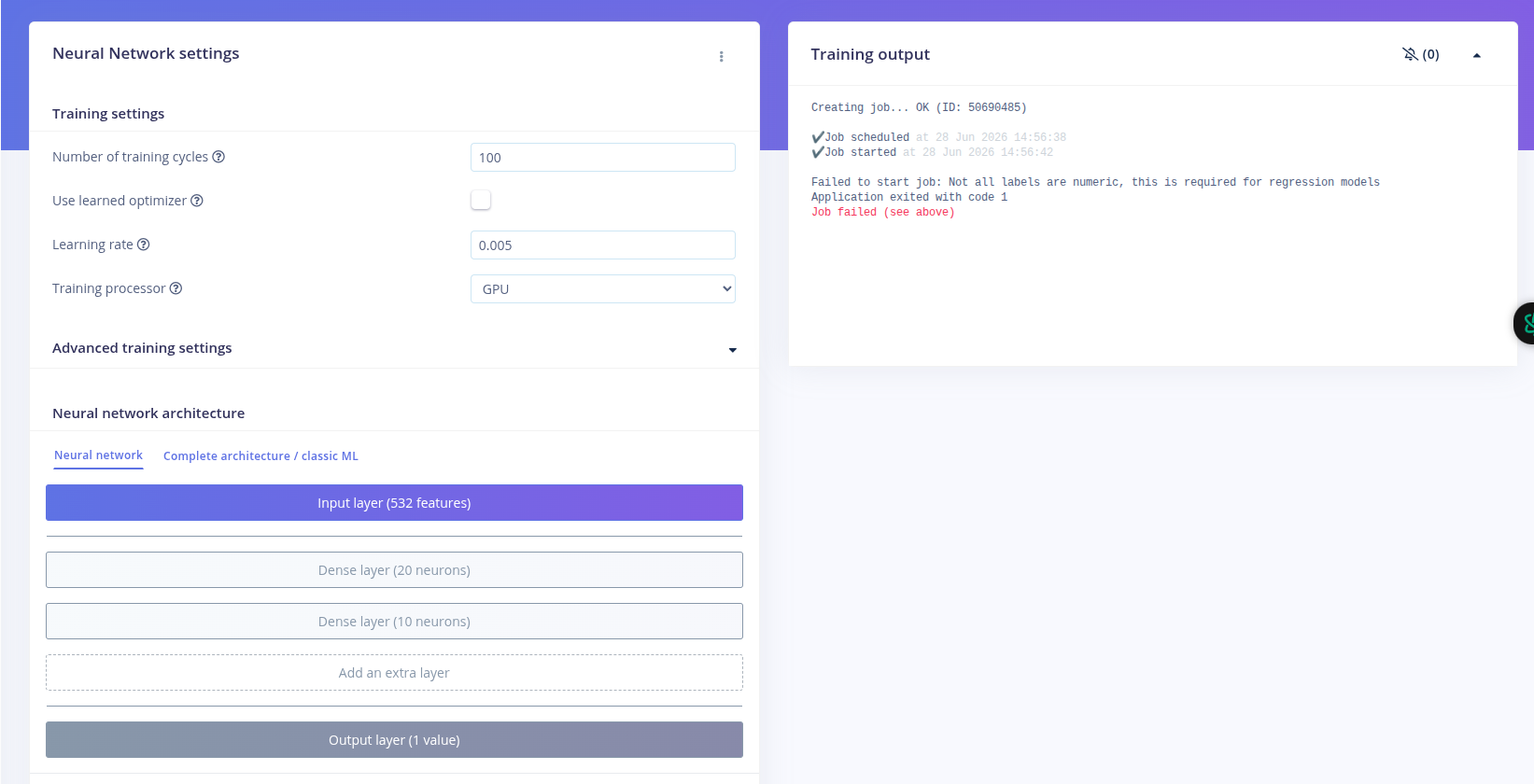
I can’t see where the non-numeric data comes from, but the error persists.
I had more screenshot but limited by the first-time user policy

I will appreciate any available guidance.
The hardware are STM32H723 and AS7265X.

Hi @avongpa - welcome to the forum!

Are you willing to share your project ID so that we can take a closer look at the data.

You can find your project ID on the dashboard in the project info panel on the right hand side, or in the URL: studio.edgeimpulse.com/studio/<project-id>.

Sure!

This is the Project ID 1043521

Thanks! I’ll take a look now and, if I don’t see anything obvious, I’ll ask the rest of the team for some help.

OK, so a few things are going on here.

First, the job is failing to start because of what the error message says: Not all labels are numeric. Your impulse uses a regression block and a regression model expects to predict a continuous numerical value, e.g. 10, 22.4, 50.7, etc. Your labels, however, are not numeric, they are in the format of p75d25. So, if what you are trying to predict is the P+D ratio based on the sensor readings, what you want is a classification block in your impulse. That’s why classification works, because your data samples are set up with discrete labels. What do you want the model to predict?

The reason you are getting 0% accuracy for classification is likely because you have very limited data. You only have one sample for each label, each of only 6 seconds duration, split into 6 windows of 1 second each. And these get split between training and validation in the training loop (80/20), so you only have 4 or 5 windows of data for each label for training, which doesn’t give the model much info to learn from.

Next, your data samples contain the timestamp as one of the sensor readings, and it fluctuates from 0 to a number around ~300, back to 0, back to 300, repeating that pattern for each sample reading. So this isn’t actually a timestamp and I’m not sure what you are sending over the data forwarder here. Also the timestamp values are an order of magnitude larger than the sensor readings, which will skew how the model learns. Regardless, the timestamp shouldn’t be included as part of the sensor readings.

Lastly, you said you had CSV files. The best way to upload these would be to first create a configuration using the CSV Wizard that then gets applied to every CSV file you upload. That’s what it’s there for, to convert your CSV file format into the format that Edge Impulse expects. Did you try the Wizard? Is this where you were getting stuck?

Once you get the data loaded properly and a model training without issues, the real task is going to be data collection, and seeing if there are meaningful differences between the channel readings for each concentration mix that the model can actually learn to distinguish between them.

I appreciate the thorough walkthrough of the issue.
I understand now; it’s an issue with the label, not the sensor data itself.
I will correct it and have a go one more time.

The timestamp reads zero; that comes from the second sensor which has been disabled.
I disabled the second sensor to ensure I got the project working with one before enabling the second.
So the zero data are coming from the buffer of the second sensor, which was initialised to zeroes.

When I first raised the issue, I didn’t want to complicate things, so I explained based on a single data source.

By the way, the experiment would develop a single model from the data of both sensors, and then during the inference, we compare the performance of each. So, for now, I will focus on getting only one to work and then integrate the second later.

From the documentation, using the CSV wizard looks simple and straight, but I couldn’t understand why I struggled with it.

Anyway, thanks, and I will come back here until it works as expected.

OK hopefully that info helped you move forward. If you get stuck with the CSV Wizard, let us know. Cheers!