Question/Issue:
Since App-Lab and Uno-Q update, Object Detection apps are now using standard object-detection model when they were using imported Edge-Impulse .eim files
Project ID:
904591
Context/Use case:
Model trained, exported and run on Uno-Q to detect drones.
Summary:
Custom model was running successfully before App-Lab and Uno-Q updates.
Steps to Reproduce:
Run Drone Detection App. This is the Detect Objects on Camera demo, pointing to a custom model .eim
Expected Results:
Prior to tools and dev-kit update, the app would run and it would “detect” drones with label and bounding box.
Actual Results:
After Tools and dev-kit update all Object-Detection apps that were previously using custom models are now using the same generic object detection model. Custom objects are not detected, but cup, keyboard, monitor etc… are all detected as per default object-detection model.
The variable set in the app.yaml file to direct the App to use a custom model (.eim file) does not seem to work anymore.
name: DJE-Drone-Detection description: This example showcases object detection within a live feed from a USB camera. ports: [] bricks: - arduino:video_object_detection: {
[ ] Always. All object detection apps are now falling back on a common model where previously they were using individual models generated in Edge-Impulse…
Environment:
Platform: Uno-Q
O/S Win11, accessing Uno-Q with VS-Code and App-Lab v0.5.0
Update. I can switch between the three default models under the Brick-Configuration Wizard and they run as expected, but I can no longer get the Video Object Detection App to use my imported models stored at
Ok, embarrassing… I’ve found the App-Lab tutorial for linking your App-Lab v0.5.0 to your Edge Impulse account, and immediately I can download all my EI models to their respective Apps on the Uno-Q. The issue is fixed.
However, I’d still like to understand why the “classic” method of manually downloading and pointing to the .eim files no longer works.
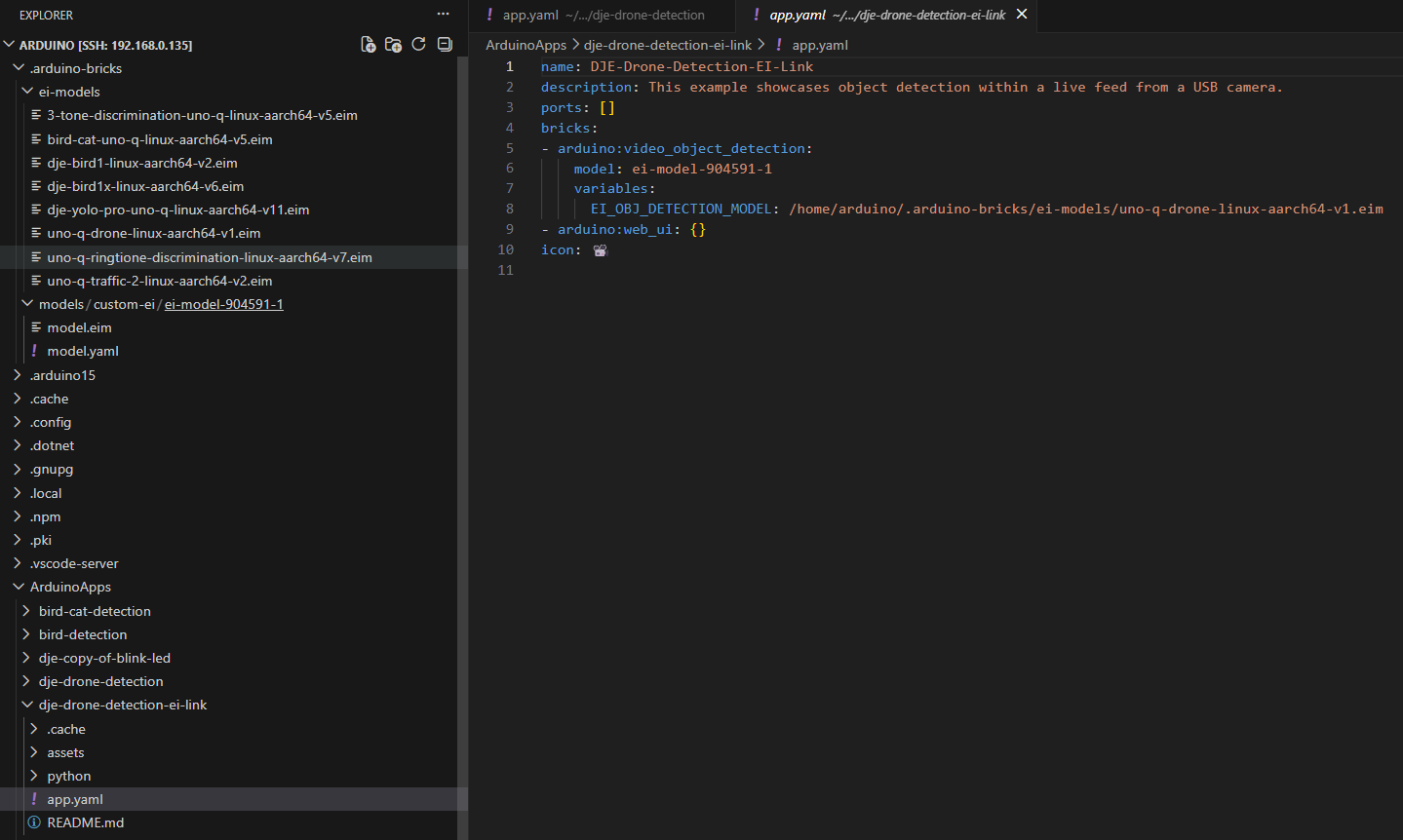
Here you can see where the newly cloned project still has the variable EI_OBJ_DETECTION_MODEL pointing to the .eim file, but now we have an extra argument at line-6, where we see model pointing to the newly downloaded .eim file, that’s stored in a new location /home/arduino/.arduino-bricks/models/custom-ei/ei-model-904591-1
So it all works with the new flow, but the classic flow would be good to fix.
Thanks for the update @DJE666 glad the new Edge Impulse integration flow got this working again.
From your screenshots and description, it looks like App Lab 0.5.0 may now be using the new model parameter for the video object detection brick, and that this takes precedence over the older EI_OBJ_DETECTION_MODEL variable.
That would explain why the linked/downloaded models work from /home/arduino/.arduino-bricks/models/custom-ei/..., while the classic manually referenced .eim files under /home/arduino/.arduino-bricks/ei-models/... are ignored.
So this seems less like a model issue and more like either a backward-compatibility regression or a change in expected configuration in App Lab 0.5.0. Agreed that it would be good to either restore the classic flow or document that the new model field is now the supported path.
Hi @Eoin@DJE666 ,
I am facing the same issue with my custom model integration. I am using latest Applab IDE v 0.8.0 .
Please help me what do I need to change in my project.
Try to download the arduino-app-cli 0.11.1 that fixes the regression which doesn’t allow to select a custom model in arduino:video_object_detection brick.
This fix requires that the model is deleted and re-downloaded!