Hi I have completed a project on Edge Impulse for classifying Acute Lymphoblastic Leukaemia, and now converting the Arduino BLE 33 Sense camera example to run from an SD card. I can see in the Edge Impulse SDK that TfLiteTensor** input exists in tflite_micro.h and I need to access this via the main Arduino script, however I cannot seem to access this in code. Could you shed some light as getting a little lost in the sdk source. I also need to access interpreter TIA
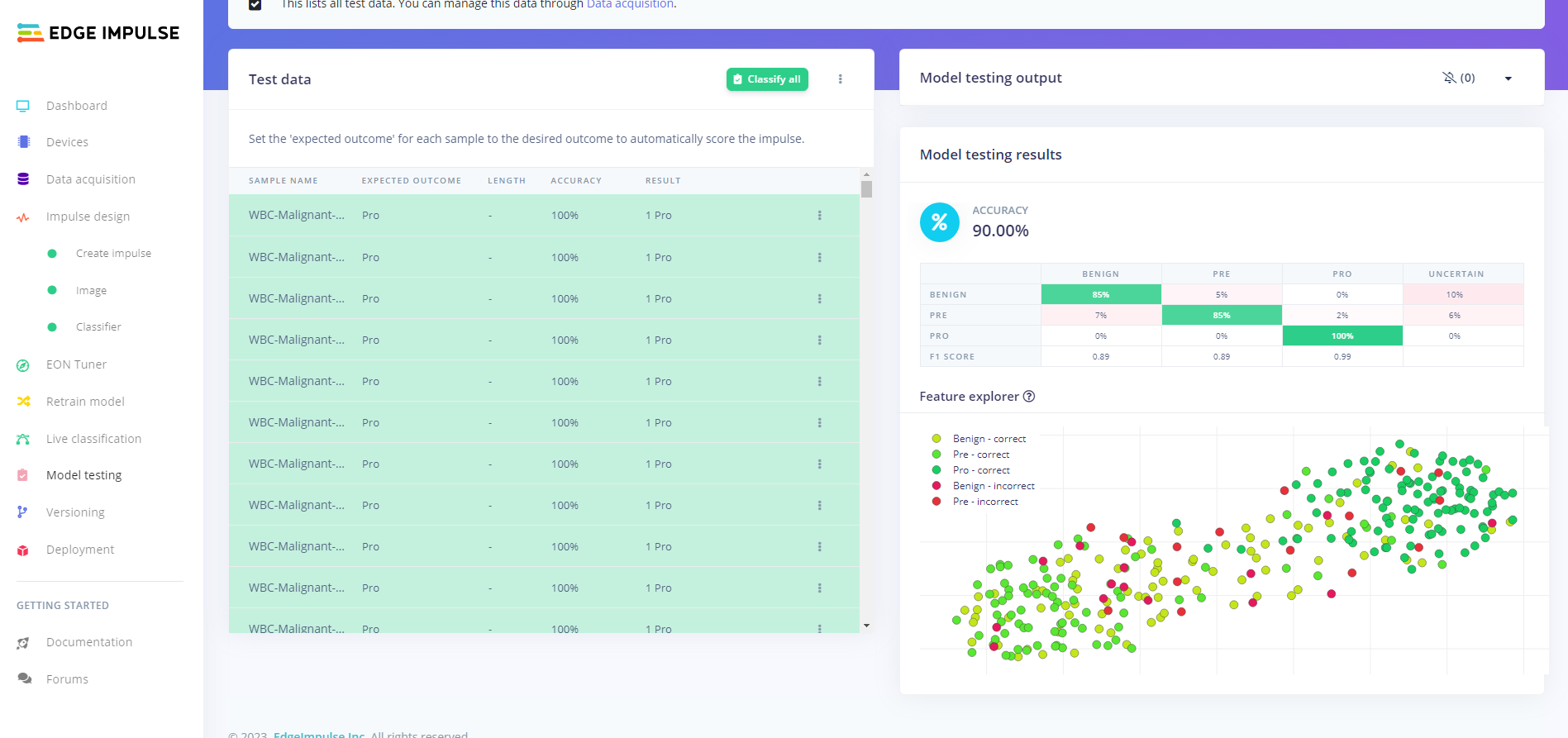
I went a different way with this, but having issues. My model achieves 90% on the test data in Studio, I ad to reduce the inputs to 64 x64 due to ram:
The test data stored on the SD card is already resized and greyscaled, I read in the bytes from each image and store them, and the callback function raw_feature_get_data is passed to the signal struct. I am receiving always benign classification and always at 0.99609 confidence. It has been a sleepless night  Here is the code:
#include "Arduino.h"
#include <SPI.h>
#include <SD.h>

#include <Acute_Lymphoblastic_Leukaemia_Classifier_inferencing.h>

String images[]={
    "1_B.JPG",
    "2_B.JPG",
    "3_B.JPG",
    "4_B.JPG",
    "5_B.JPG",
    "1_PRE.JPG",
    "2_PRE.JPG",
    "3_PRE.JPG",
    "4_PRE.JPG",
    "5_PRE.JPG",
    "1_PRO.JPG",
    "2_PRO.JPG",
    "3_PRO.JPG",
    "4_PRO.JPG",
    "5_PRO.JPG",
};

static bool debug_nn = false;
int8_t *image_data = NULL;

void setup()
{

  Serial.begin(9600);
  while (!Serial) {
    ;
  }

  Serial.println(F("Initialising SD card..."));
  if (!SD.begin(10)) {
    Serial.println(F("Initialisation failed!"));
    return;
  }
  Serial.println(F("Initialisation done."));

  // summary of inferencing settings (from model_metadata.h)
  ei_printf("Inferencing settings:\n");
  ei_printf("\tImage resolution: %dx%d\n", EI_CLASSIFIER_INPUT_WIDTH, EI_CLASSIFIER_INPUT_HEIGHT);
  ei_printf("\tFrame size: %d\n", EI_CLASSIFIER_DSP_INPUT_FRAME_SIZE);
  ei_printf("\tNo. of classes: %d\n", sizeof(ei_classifier_inferencing_categories) / sizeof(ei_classifier_inferencing_categories[0]));

  for (int i = 0; i < 15; i++) {
    processImage(images[i], image_data);

    ei::signal_t signal;
    signal.total_length = EI_CLASSIFIER_INPUT_WIDTH * EI_CLASSIFIER_INPUT_HEIGHT;
    signal.get_data = &raw_feature_get_data;

    ei_impulse_result_t result = { 0 };

    EI_IMPULSE_ERROR ei_error = run_classifier(&signal, &result, debug_nn);
    if (ei_error != EI_IMPULSE_OK) {
        ei_printf("Failed to run impulse (%d)\n", ei_error);
        break;
    }

    ei_printf("Predictions (DSP: %d ms., Classification: %d ms., Anomaly: %d ms.): \n",
              result.timing.dsp, result.timing.classification, result.timing.anomaly);

    for (size_t ix = 0; ix < EI_CLASSIFIER_LABEL_COUNT; ix++) {
        ei_printf("    %s: %.5f\n", result.classification[ix].label,
                                    result.classification[ix].value);
    }
    delay(2000);
  }
}

TfLiteStatus processImage(String filename, int8_t* image_data){
  File jpegFile = SD.open(filename, FILE_READ);

  if ( !jpegFile ) {
    Serial.println(F("ERROR: File not found!"));
    return kTfLiteError;
  }
  Serial.println(filename);

  uint16_t imsize = jpegFile.size();

  for (int i = 0; i < imsize; i++){
    image_data[i] = (uint8_t)jpegFile.read();
  }

  return kTfLiteOk;
}

int raw_feature_get_data(size_t offset, size_t length, float *out_ptr) {
    size_t pixel_ix = offset * 2;
    size_t bytes_left = length;
    size_t out_ptr_ix = 0;

    // read byte for byte
    while (bytes_left != 0) {
        // grab the value and convert to r/g/b
        uint16_t pixel = (image_data[pixel_ix] << 8) | image_data[pixel_ix+1];
        uint8_t r, g, b;
        r = ((pixel >> 11) & 0x1f) << 3;
        g = ((pixel >> 5) & 0x3f) << 2;
        b = (pixel & 0x1f) << 3;

        // then convert to out_ptr format
        float pixel_f = (r << 16) + (g << 8) + b;
        out_ptr[out_ptr_ix] = pixel_f;

        // and go to the next pixel
        out_ptr_ix++;
        pixel_ix+=2;
        bytes_left--;
    }
    // and done!
    return 0;
}

void loop()
{
}
Output:
Initialising SD card...
13:46:09.188 -> Initialisation done.
13:46:09.188 -> Inferencing settings:
13:46:09.188 -> 	Image resolution: 64x64
13:46:09.188 -> 	Frame size: 4096
13:46:09.188 -> 	No. of classes: 3
13:46:09.188 -> 1_B.JPG
13:46:09.985 -> Predictions (DSP: 5 ms., Classification: 730 ms., Anomaly: 0 ms.):
13:46:09.985 ->     Benign: 0.99609
13:46:09.985 ->     Pre: 0.00000
13:46:09.985 ->     Pro: 0.00000
13:46:12.131 -> 2_B.JPG
13:46:12.961 -> Predictions (DSP: 5 ms., Classification: 730 ms., Anomaly: 0 ms.):
13:46:12.961 ->     Benign: 0.99609
13:46:12.961 ->     Pre: 0.00000
13:46:12.961 ->     Pro: 0.00000
13:46:15.091 -> 3_B.JPG
13:46:15.925 -> Predictions (DSP: 5 ms., Classification: 730 ms., Anomaly: 0 ms.):
13:46:15.925 ->     Benign: 0.99609
13:46:15.925 ->     Pre: 0.00000
13:46:15.925 ->     Pro: 0.00000
13:46:18.060 -> 4_B.JPG
13:46:18.865 -> Predictions (DSP: 5 ms., Classification: 730 ms., Anomaly: 0 ms.):
13:46:18.865 ->     Benign: 0.99609
13:46:18.865 ->     Pre: 0.00000
13:46:18.865 ->     Pro: 0.00000
13:46:21.047 -> 5_B.JPG
13:46:21.883 -> Predictions (DSP: 5 ms., Classification: 730 ms., Anomaly: 0 ms.):
13:46:21.883 ->     Benign: 0.99609
13:46:21.883 ->     Pre: 0.00000
13:46:21.883 ->     Pro: 0.00000
13:46:23.985 -> 1_PRE.JPG
13:46:24.820 -> Predictions (DSP: 5 ms., Classification: 730 ms., Anomaly: 0 ms.):
13:46:24.820 ->     Benign: 0.99609
13:46:24.820 ->     Pre: 0.00000
13:46:24.820 ->     Pro: 0.00000
13:46:26.970 -> 2_PRE.JPG
13:46:27.788 -> Predictions (DSP: 5 ms., Classification: 730 ms., Anomaly: 0 ms.):
13:46:27.788 ->     Benign: 0.99609
13:46:27.788 ->     Pre: 0.00000
13:46:27.788 ->     Pro: 0.00000
13:46:29.934 -> 3_PRE.JPG
13:46:30.761 -> Predictions (DSP: 5 ms., Classification: 730 ms., Anomaly: 0 ms.):
13:46:30.761 ->     Benign: 0.99609
13:46:30.761 ->     Pre: 0.00000
13:46:30.761 ->     Pro: 0.00000
13:46:32.907 -> 4_PRE.JPG
13:46:33.728 -> Predictions (DSP: 5 ms., Classification: 730 ms., Anomaly: 0 ms.):
13:46:33.728 ->     Benign: 0.99609
13:46:33.728 ->     Pre: 0.00000
13:46:33.728 ->     Pro: 0.00000
13:46:35.901 -> 5_PRE.JPG
13:46:36.703 -> Predictions (DSP: 5 ms., Classification: 730 ms., Anomaly: 0 ms.):
13:46:36.703 ->     Benign: 0.99609
13:46:36.703 ->     Pre: 0.00000
13:46:36.703 ->     Pro: 0.00000
13:46:38.853 -> 1_PRO.JPG
13:46:39.658 -> Predictions (DSP: 5 ms., Classification: 730 ms., Anomaly: 0 ms.):
13:46:39.658 ->     Benign: 0.99609
13:46:39.658 ->     Pre: 0.00000
13:46:39.658 ->     Pro: 0.00000
13:46:41.799 -> 2_PRO.JPG
13:46:42.636 -> Predictions (DSP: 5 ms., Classification: 730 ms., Anomaly: 0 ms.):
13:46:42.636 ->     Benign: 0.99609
13:46:42.636 ->     Pre: 0.00000
13:46:42.636 ->     Pro: 0.00000
13:46:44.772 -> 3_PRO.JPG
13:46:45.588 -> Predictions (DSP: 5 ms., Classification: 730 ms., Anomaly: 0 ms.):
13:46:45.588 ->     Benign: 0.99609
13:46:45.588 ->     Pre: 0.00000
13:46:45.588 ->     Pro: 0.00000
13:46:47.763 -> 4_PRO.JPG
13:46:48.566 -> Predictions (DSP: 5 ms., Classification: 730 ms., Anomaly: 0 ms.):
13:46:48.566 ->     Benign: 0.99609
13:46:48.566 ->     Pre: 0.00000
13:46:48.566 ->     Pro: 0.00000
13:46:50.712 -> 5_PRO.JPG
13:46:51.564 -> Predictions (DSP: 5 ms., Classification: 730 ms., Anomaly: 0 ms.):
13:46:51.564 ->     Benign: 0.99609
13:46:51.564 ->     Pre: 0.00000
13:46:51.564 ->     Pro: 0.00000
I feel I may not be reading the files correctly but have not been able to resolve this issue, any help would be appreciated 
It looks like you are reading the files correctly but mess up on loading the image_data array. (don’t have an sd card to test with)
You can start by adding some debugging around here:
image_data[i] = (uint8_t)jpegFile.read();
Best
Eoin
Hi Eoin, thanks for the reply, could you elaborate, please?
Hi @AdamMiltonBarker ,
image_data is declared as a pointer not as an array that can hold image data. Also, the name image_data is used as a function parameter name.
2 Likes
I knew it would be something stupid. Sorry to waste your time and thank you both for your time.
1 Like