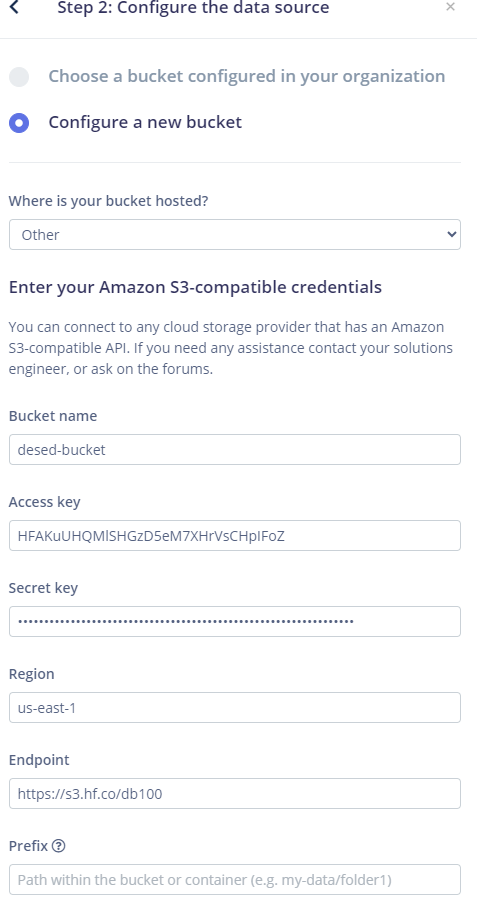
i am trying to import a public bucket from hugging face and that failes with gateway timeout error. here the official doc: S3 Compatibility · Hugging Face
Welcome to the forum,
There can be quite a bit of variation between S3-compatible providers. One possible issue is the CORS configuration. Our S3 requirements here: Cloud data storage - Edge Impulse Documentation
For Hugging Face, I believe the endpoint should use the account or organisation namespace:
Hugging Face namespace: db100
Hugging Face bucket: desed-bucketEndpoint: https://s3.hf.co/db100
Bucket name: desed-bucket
Looking at your config the endpoint is correct only when db100 is the Hugging Face username or organisation that owns desed-bucket. Hugging Face places the namespace in the endpoint and expects the separate bucket field to contain only the bare bucket name. See the HF docs and make sure it fits the guidelines - S3 Compatibility · Hugging Face
Personally I have previously encountered issues with Hugging Face token configuration, particularly around read, write and fine-grained token permissions. Just a lot of trial an error to get it going 
Make sure the credentials were generated according to Hugging Face’s S3 credential guidance and that they have the permissions set as per the HF spec if you can:
I will also try following their steps and see if I hit your issue… Are you currently working with one of our solutions engineers or using an enterprise trial? If so, we can loop them into the discussion.
@ashvin @dayberry @yodaimpulse fyi appreciate the input if you know this one 
Best
Eoin
Followed through the guide and looking again at the gateway timeout, the first thing to verify is that you can connect to a public bucket with credentials manually to read and write:
read
aws --profile hf \
  --endpoint-url https://s3.hf.co/db100 \
  s3 ls s3://desed-bucket
write and delete
echo "Edge Impulse connection test" > ei-test.txt

aws --profile hf \
  --endpoint-url https://s3.hf.co/db100 \
  s3 cp ei-test.txt s3://desed-bucket/ei-test.txt

aws --profile hf \
  --endpoint-url https://s3.hf.co/db100 \
  s3 rm s3://desed-bucket/ei-test.txt
Although the Hugging Face bucket is public, our Edge Impulse cloud-storage integration requires authenticated S3 credentials that permit read, write and delete operations. During verification, Edge Impulse writes an .ei-portal-check object and then deletes it, so anonymous public access or read-only credentials will not be sufficient. (The test above will prove the credentials are correct)
The Hugging Face S3 credentials should therefore be generated from a token with write access and permission for the relevant namespace and bucket.
Hugging Face also requires several client-specific S3 settings - S3 Compatibility · Hugging Face
- path-style bucket addressing;
-
ListObjectsV2, becauseListObjectsV1is unsupported; - request checksum calculation set to
when_required; - response checksum validation set to
when_required.
Checking with our engineering team to see if there is any other gotchas, try running through the settings I shared here and they should reply next week @dberardo-com.
Hopefully that helps,
Best,
Eoin
thanks for the quick reply and btw nice tutorial on youtube about the glass breaking application of edge impulse on arduino (this is how i got to know about you btw).
i have now tried to use a full access token from hugging face (the previous one was read only) but still no success.
also i wanted to mention that i am familiar with Minio as an alternative to AWS and they also require path-style bucket addressing, so i am guessing it might be wortwhile to look into it for future integrations.
looking forwrard to await your engineering team’s response
cheers and bon weekend !
1 Like
Glad to hear you enjoyed our videos @dberardo-com, we have many accompanying tutorials here too:
Quick update:
We have reproduced the timeout and logged a bug for you with our engineering team. Once we have a resolution we will let you know, Hugging Face has a slightly different spec for their clients causing the timeout.
We will post here once we have a workaround or applied a fix, anticipate a week or so @dberardo-com post testing if we need to wait for a release to apply a change (depending on engineering release cycles). @angelos @jamesc fyi.
Best
Eoin
1 Like
hi there, let me know if i should make any more attempts. thanks
btw i have tried to access the bucket from duckdb and all custom params where not needed … really only path style was enough
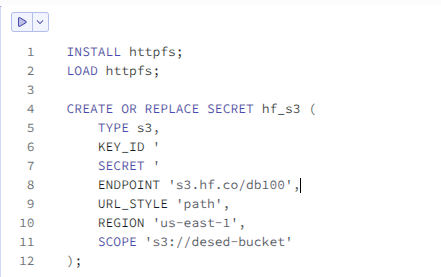
please not the bucket contains parquet files
SELECt * exclude audio
FROM read_parquet(
‘s3://desed-bucket/**/*.parquet’,
union_by_name = true,
filename = true
)
LIMIT 10;
| labels | label_names | filename |
|---|---|---|
| [0, 0, 0, 0, 0, 0, 0, 1, 0, 1] | [Electric_shaver_toothbrush, Running_water] | s3://desed-bucket/data/test-00000-of-00002.parquet |
| [0, 0, 0, 1, 0, 0, 0, 0, 1, 0] | [Dog, Alarm_bell_ringing] | s3://desed-bucket/data/test-00000-of-00002.parquet |
| [1, 0, 0, 0, 0, 0, 0, 0, 0, 0] | [Dishes] | s3://desed-bucket/data/test-00000-of-00002.parquet |
| [0, 0, 1, 1, 0, 0, 0, 0, 0, 1] | [Running_water, Dog, Frying] | s3://desed-bucket/data/test-00000-of-00002.parquet |
| [1, 1, 0, 0, 0, 0, 0, 0, 1, 1] | [Dishes, Alarm_bell_ringing, Running_water, Cat] | s3://desed-bucket/data/test-00000-of-00002.parquet |
| [0, 0, 1, 1, 0, 0, 1, 0, 0, 0] | [Vacuum_cleaner, Frying, Dog] | s3://desed-bucket/data/test-00000-of-00002.parquet |
| [0, 1, 1, 1, 0, 1, 0, 0, 0, 0] | [Frying, Dog, Speech, Cat] | s3://desed-bucket/data/test-00000-of-00002.parquet |
| [0, 1, 0, 0, 0, 0, 0, 0, 0, 0] | [Cat] | s3://desed-bucket/data/test-00000-of-00002.parquet |
| [0, 0, 1, 0, 0, 0, 0, 1, 0, 0] | [Electric_shaver_toothbrush, Frying] | s3://desed-bucket/data/test-00000-of-00002.parquet |
| [0, 0, 0, 1, 0, 0, 0, 1, 1, 0] | [Electric_shaver_toothbrush, Alarm_bell_ringing, Dog] | s3://desed-bucket/data/test-00000-of-00002.parquet |