I’m using the sample splitter to separate a 30-second sample into individual keyword samples. The splitter generally works, but when I zoom in then out, it forgets the last sample window and moves it somewhere else in the 30 second sample. Has anyone else seen this?
BTW, I can provide a project and video showing the issue if someone on the team wants to take a look.
Thank you for posting this. Can you please provide a screen capture of the issue? That will help the investigation. Thanks.
@salmanedgeimpulse Thank you for your reply! I have a video, but the forum doesn’t allow me to upload .mp4 files. Here’s a screen shot showing the result.
I zoomed into my 30-second sample in the split editor. The segment surrounding the last occurrence of my keyword was missing. I drew it in, then zoomed out. The segment was missing again and there were other “phantom” segments in the sample.
Let me know if I can provide any more information. This is repeatable for me.
Also, BTW, the handle on the zoom control on the left is a little off center. FWIW 
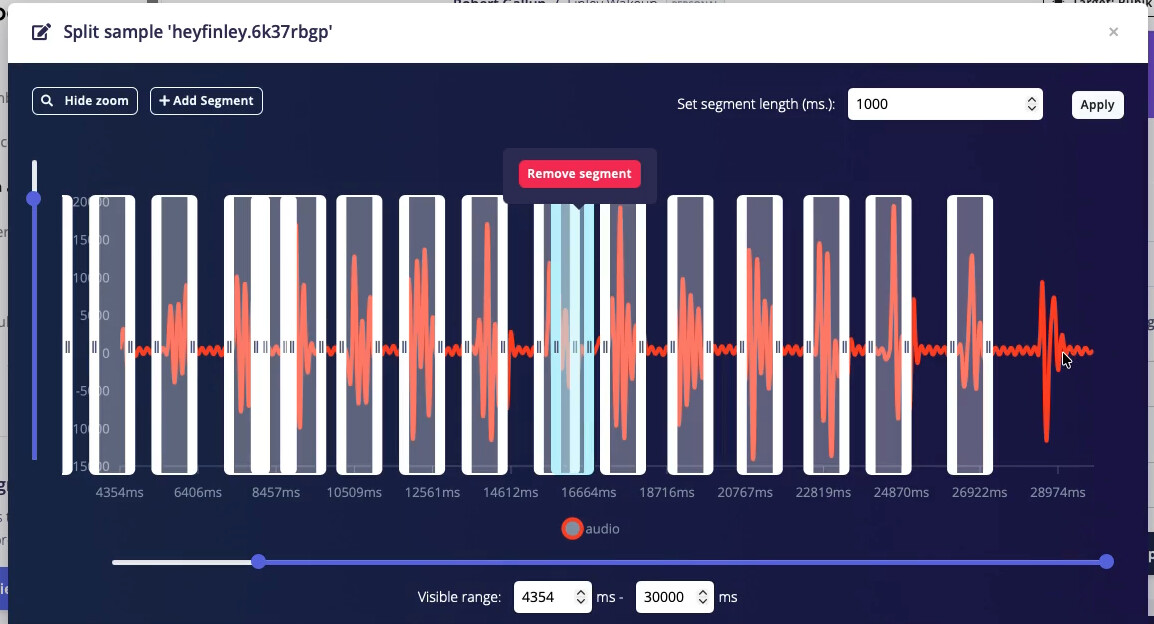
Another bit of information. This glitch doesn’t seem to appear the first time you enter the sample splitter. But if you enter the split editor, cancel, then edit the long sample again, that’s where the issue comes up.
So, maybe this isn’t a common scenario, but I have run into it because if you mouse down on a zoom handle and release the mouse outside of the split editor, it immediately closes the split editor window. I then have to repeat the split where the glitch shows up. This overshoot and release happens to me fairly often.
I’ve logged these bugs with the engineering team- hope to have a fix soon!
1 Like